

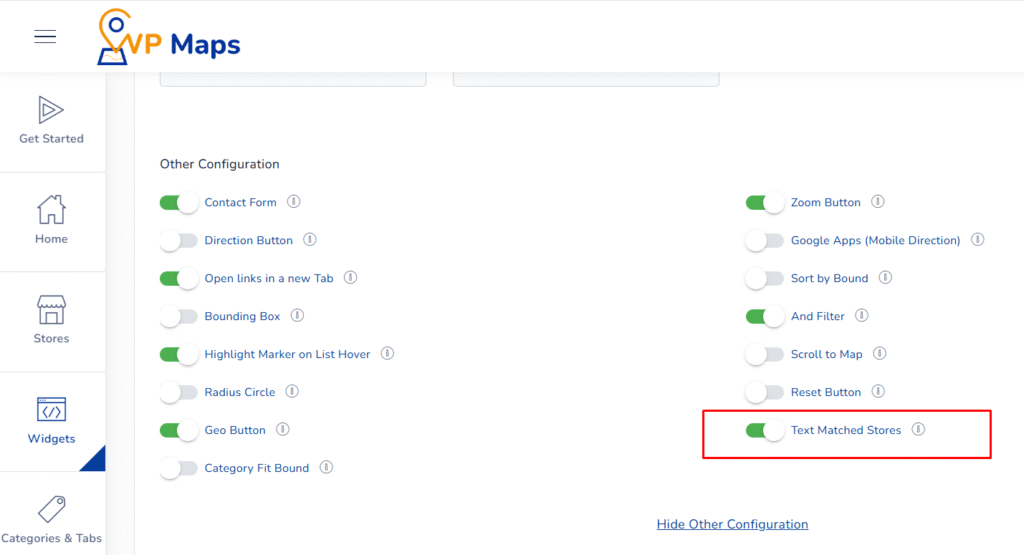
WP Maps includes a powerful Text Matched Store feature that enhances search accuracy by ensuring users see the most relevant store results, even when those results fall outside the selected search radius.
What This Option Does #
When the Text Matched Store option is enabled, the store locator doesn’t limit results strictly to the selected range. Instead, it intelligently returns stores that best match the user’s typed search term, regardless of their distance from the selected area.
For example, if a user types “Downtown Pharmacy” but there’s no such store within 20km, the widget will still show the best-matching stores, even if they’re farther away, rather than returning no results. This makes the search more flexible, forgiving, and useful.
This feature is particularly helpful when:
- Users search by name or partial address
- No relevant store is available within the default range
- You want to prioritize text relevance over proximity
Benefits of This Setting #
- Smarter Search Results – Ensures that users always get a relevant response based on their input.
- Fewer “No Results” Cases – Avoids frustrating empty results by showing the best text match outside the radius.
- Ideal for Name-Based Search – Perfect for users searching by store name or brand.
- Increases Conversion – Keeps users engaged by always showing something useful.
How to Configure #
- Log in to your WP Maps account and click on the “Widgets” tab.
- Click on “Install Widget”.

- Under the “UI Setting” section, locate the Text Matched Stores option.

- Enable the toggle to activate this feature.
- Save your settings and test the search bar to verify behavior.


For any questions or concerns, feel free to contact us at [email protected].


