

WP Maps provides essential interactive buttons that enhance how users interact with your store locator.
These buttons include navigation directions, map zoom, reset view, and geo-location — all of which contribute to a smoother, more functional map experience.
What These Options Do #
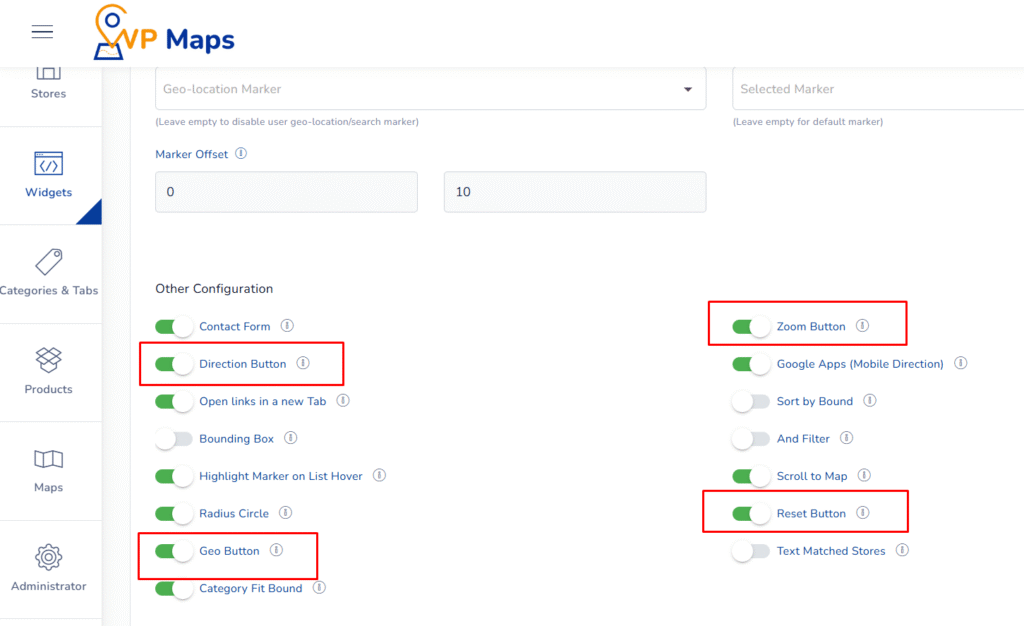
1. Direction Button #
This feature enables a clickable link within each store listing and info window that opens navigation directions using the selected map provider (Google Maps, Mapbox, etc.).
It helps users instantly find how to reach the store from their current location or any starting point.
2. Zoom Button #
Adds plus (+) and minus (–) zoom buttons to the map interface inside the info window or map area.
These are especially useful for desktop users who prefer clicking instead of scrolling to adjust the zoom level.
3. Reset Button #
This button resets the map to its original default position, which includes the initial zoom level and center coordinates.
It’s helpful for users who’ve navigated far off the main area and want to re-center the map quickly.
4. Geo Button #
Activates the geo-location feature within the store locator widget. When clicked, it requests the user’s current location and displays nearby stores based on real-time distance.
This feature is particularly useful for mobile users looking for stores around them.
Benefits of These Settings #
- User-Friendly Navigation – Visitors can quickly zoom in/out, reset views, or get directions, making the map highly usable.
- Mobile Convenience – Geo Button and Directions ensure on-the-go users can locate the nearest stores without hassle.
- Better User Engagement – Interactive controls increase user interaction time and satisfaction.
- Reduces Drop-Off – Helps users get back to the default view or find their position easily, improving map usability.
How to Configure #
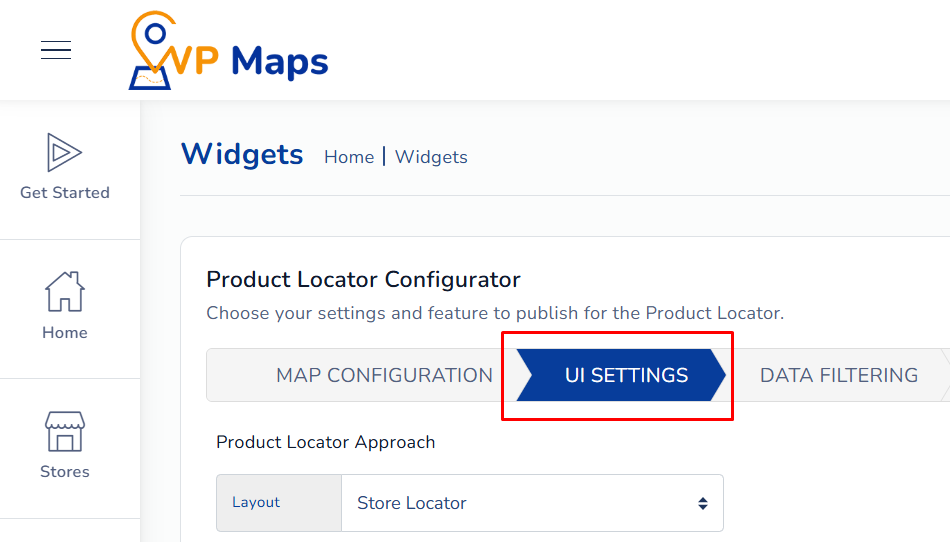
- Log in to your WP Maps account and click on the “Widgets” tab.
- Click on “Install Widget”.

- Under the “UI Setting” section, locate the options in question.

- Enable or disable the Direction, Zoom, Reset, and Geo buttons depending on your requirements.
- Save your settings and refresh the store locator widget.

For any questions or concerns, feel free to contact us at [email protected].


