
Connect Shoppers to Stores
Help Shopify shoppers find nearby stores and stockists that carry your products.
Help customers find stores, dealers, and products on your Shopify site with one embed code and quick locator management.

Trusted by Shopify, retailers and CPG brands
Retail Connections
Help Shopify shoppers find nearby stores and stockists that carry your products.
Customize colors and templates to give a locator a look that matches your brand.
Update store details and product listings centrally from your WP Maps dashboard.
Simple Setup
Upload your store locations using a CSV spreadsheet.
Add stores, choose a template, and pick your colors.
Publish your locator, then copy its HTML embed code.
Create a page in Shopify to display the new locator.
Select Show HTML in the editor to insert embed code.
Paste the embed code, save your page, and preview it.
Create a Shopify locator with WP Maps, embed it or install the app, and help shoppers find your products, explore nearby stores, and get directions for the next store visit.
Create a product and store locator with WP Maps and embed it on your Shopify storefront in minutes, customizing its appearance to match your brand and helping shoppers find the right locations.

Help shoppers move from your Shopify store to a nearby store with WP Maps, displaying stores and dealers on one map, sharing clear store details, and providing directions that encourage visits.

Install WP Maps from the Shopify App Store to create a product and store locator for your website, customize its design to suit the brand, and help shoppers discover products and nearby stores.

Use Cases
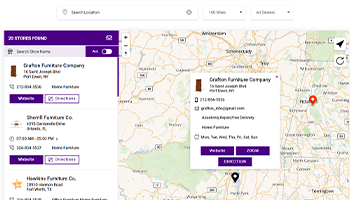
Help visitors find furniture shops nearby, check store hours, and get directions to visit.
View Live Demo ->
Assist shoppers find beverage stores nearby, explore drink options, and plan the next visit.
View Live Demo ->
Let shoppers explore automobile products and find nearby shops that carry their favorites.
View Live Demo ->Watch
From a blank page to a live locator, step by step.
Powerful Features
Let your buyers search stores by city or ZIP code.
Choose Google Maps or Mapbox for your locator map.
Help shoppers find open stores and plan the visit.
Translate locator text to suit the local shoppers.
Group products by category for organized browsing.
Collect customer details with built-in lead forms.
Start your free trial today and see the impact without any credit card required.
Everything you need to know about WP Maps.
A store locator software is a tool that helps you create a map widget for your website. This widget allows your customers to easily find your nearest stores, warehouses, pickup points, or any other locations you want to highlight. It's a convenient way to guide people to your physical locations.
See what our customers say about WP Maps.
“I like to give credit where credit is due and it is definitely due here! Their product is amazing and so easy to use. I had contacted their customer support because I wanted a feature I did not see available. Their customer support reached out to me immediately and helped me achieve my desired goal. I am so happy to have bought this product and to continue to support. I completely recommend!”
James Anderson
Chief Technology Officer (CTO)
“Apart from its great performance, I had a rather tricky problem that I could not solve. I contacted the support and they always offered me a quick response, and they have solved the problem. Very professional, capable, and close to the customer.”
David Williams
Data Analyst
“The setup, customization features, theme appearance options, and tech support for this location mapping plug-in are all fantastic! We are using it to feature locations that participate with our non-profit feeding ministry.”
William Brown
Chief Digital Officer
“I have to say I’m impressed with support quality. Not only you get answers right away, they also did help me with moving settings from one site to the other even tho I just asked if it’s possible to import them somehow. If you are looking for this type of plugin, look no further, this is the way to go :)”
Scott McDaniel
Web Development Manager, Truelio